Announcements
Latest Type of Cyberattack: Quishing
We are seeing an increase in phishing and email scam attempts targeting the university, including messages that contain attachments or images with QR codes as shown in the below example.
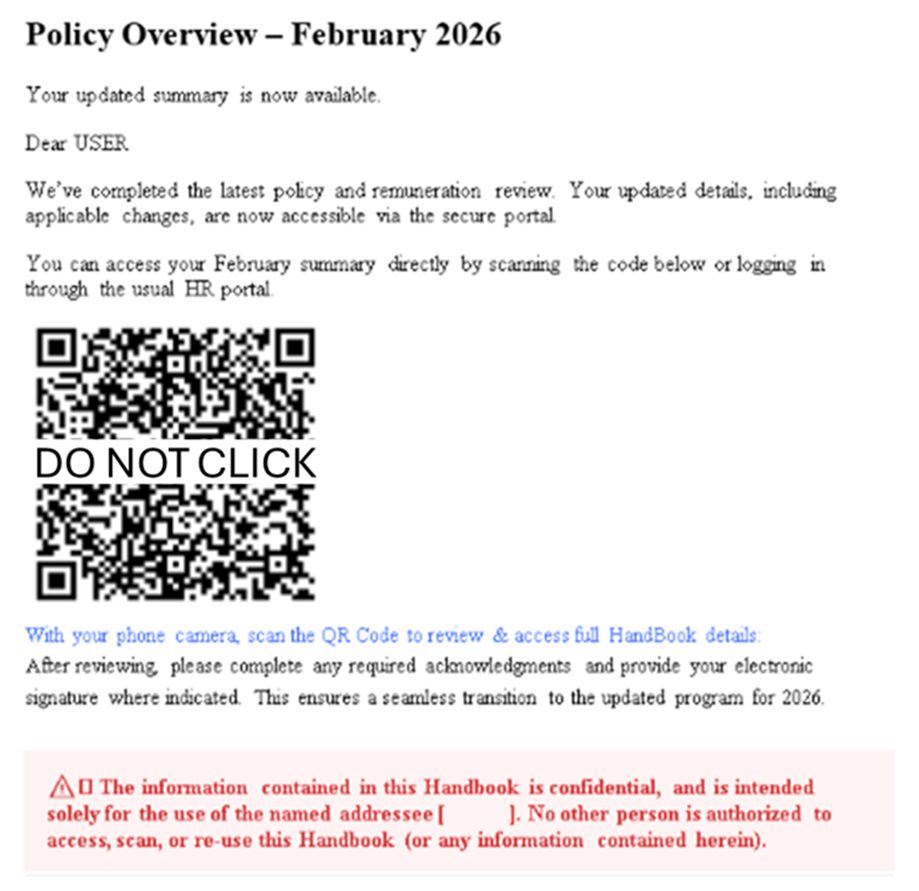
Many of these emails are designed to look legitimate by using:
- The name of the university in the subject line
- Subjects that appear urgent, official, or work-related
- Language suggesting required action by employees, faculty, or students
These messages may claim to relate to:
- Account or password issues
- Payroll, benefits, or direct deposit changes
- Job opportunities or required forms
- Invoices, documents, or “important notices”
Please be aware: scanning QR codes from unsolicited emails can lead to malicious websites designed to steal your login credentials or install malware.
What you should NOT do:
- Do not open unexpected attachments or scan QR codes from emails, even if the subject line references the university.
- Do not click on links or respond to messages requesting personal or account information.
- Do not enter your University credentials after scanning a QR code.
What you SHOULD do:
- Verify the sender’s email address carefully. Phishing emails often use addresses that look similar to legitimate ones.
- Access university systems by going directly to official websites, not through email links or QR codes.
- Report suspicious messages using the university’s phishing report process or by forwarding them to abuse@immaculata.edu.
If you believe you may have interacted with a suspicious email, please contact the OTS Help Desk immediately at 484-323-3282.
Thank you for your cooperation in helping keep the Immaculata University Community secure.
